
The 15 best AI tools that can help you save time and boost your productivity in 2026. Unlock your potential today!
Introduction
In today’s fast-paced world, time is one of our most valuable resources. Juggling work deadlines, personal commitments, and endless to-do lists can leave anyone feeling overwhelmed. Fortunately, advancements in technology have given rise to a myriad of AI tools designed to help us work smarter, not harder. These tools can streamline tasks, automate mundane activities, and help boost overall productivity.
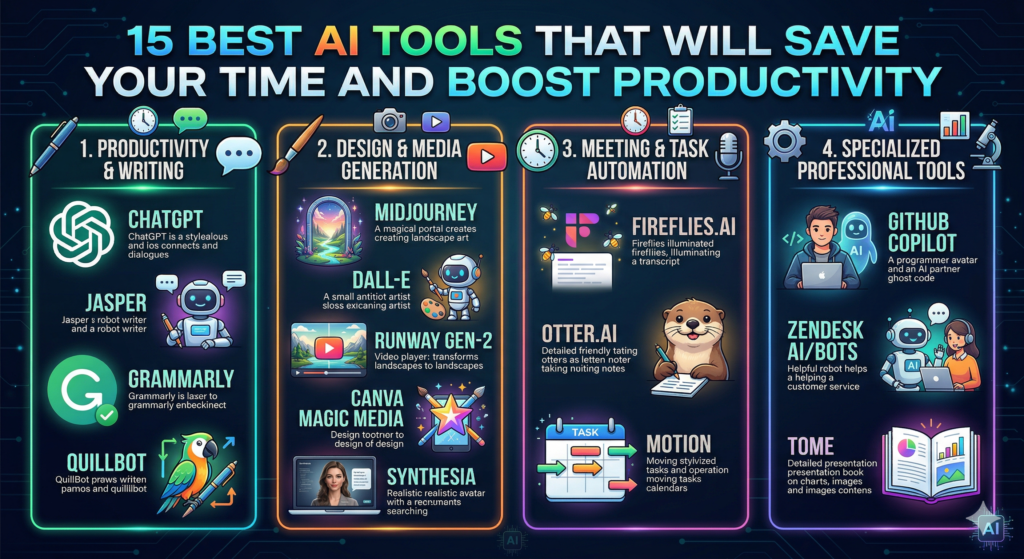
In this article, we’ll explore the 15 best AI tools that will save your time and boost productivity. Whether you need assistance with writing, project management, or even social media scheduling, there’s an AI solution out there for you. Get ready to transform your workflow and reclaim precious hours in your day!
Importance of Using AI Tools
Utilizing AI tools can revolutionize how we approach our daily tasks. Here are some benefits of incorporating AI into your routine:
- Time Efficiency: AI tools automate repetitive tasks, allowing you to focus on more critical aspects of your work.
- Enhanced Accuracy: AI solutions reduce human error, ensuring tasks are completed accurately and efficiently.
- Better Decision-Making: Many AI tools analyze data in real-time, providing insights that can enhance your decision-making process.
- Cost-Effective: By increasing productivity and reducing the time spent on tasks, AI tools can save you money in the long run.
By understanding the value of these tools, you can better assess which options could benefit you the most. So, let’s dive into our top picks!
1. ChatGPT
What Is It?
ChatGPT is an advanced AI language model that can generate human-like text based on the prompts it receives. It’s particularly useful for content creation, brainstorming ideas, and even customer support.
How It Saves Time
Imagine needing a blog post or some engaging ad copy with a tight deadline. Instead of spending hours writing from scratch, simply input your requirements into ChatGPT, and it will provide you with coherent and structured drafts within moments.
Practical Tip
For best results, give as much context as possible when prompting ChatGPT. For example, if you’re writing a blog post about productivity tips, you can specify the tone you want (e.g., professional, conversational) for better alignment with your needs.
2. Trello
How It Works
Trello is a project management tool that utilizes AI to help teams stay organized and on track. With its intuitive card-based layout, you can assign tasks, set deadlines, and track progress.
Time-Saving Features
Trello’s automation features, such as Butler, allow users to automate repetitive tasks like moving cards between lists, sending reminders, and more, saving plenty of time while keeping projects flowing seamlessly.
Practical Example
Set up a workflow where tasks are automatically moved to a “Completed” list when marked complete. This helps visualize progress without manual tracking.
3. Grammarly
The Power of Grammarly
Grammarly is an AI writing assistant that checks your text for grammar, clarity, and style errors. It’s like having a personal editor at your fingertips.
Benefits
Using Grammarly can drastically cut down the time you spend proofreading and editing. Plus, its suggestions help improve your writing’s overall quality, making communication more effective.
Example Tip
Utilize the browser extension to catch errors in emails or social media posts as you type. This way, you can ensure that your communication is polished and professional in every context.
4. Slack with AI Features
What Is Slack?
Slack is a communication platform designed for teams to collaborate efficiently. With the integration of AI tools, Slack can prioritize messages and help you manage communications better.
Streamlining Communication
AI features like Slackbot can answer common questions, send reminders, and even search for information across your workspace. This saves time spent finding answers or sending follow-up messages.
Practical Example
Set up reminders for important tasks or meetings so you never miss a deadline or appointment. This ensures that you’re always on top of your responsibilities without tracking everything manually.
5. Notion
Everything in One Place
Notion is an all-in-one workspace that combines notes, tasks, databases, and calendars into one platform. Its AI capabilities enhance note-taking and organization.
Time Efficiency
You can create templates for recurring tasks, simplifying project setup. Notion can also analyze data within your notes, streamlining your research process.
Practical Tip
Use Notion to create a habit tracker. It can help you monitor progress over time, encouraging you to stay consistent with your goals.
6. Zapier
What Is Zapier?
Zapier is an automation tool that connects various apps and services to automate workflows. With its intuitive interface, users can create “Zaps” that perform repetitive tasks automatically.
Boosting Productivity
Say goodbye to manual data entry across platforms. With Zapier, you can automatically sync information between tools like Google Sheets, Trello, and Gmail.
Practical Example
Set up a zap that automatically saves email attachments into a designated Google Drive folder. This helps keep files organized without manual effort.
7. Todoist
Task Management Made Easy
Todoist is a task management app that makes organizing your to-do list a breeze. Its AI features help prioritize tasks and set achievable goals.
Saving Time on Organization
With smart scheduling options, Todoist can suggest the best times to complete tasks based on your habits. This ensures you stay on track without feeling overwhelmed.
Example Usage
Use labels and filters to categorize tasks by project or urgency. This way, you can focus on what’s most important first.
8. HubSpot
A Comprehensive Tool
HubSpot is known for its robust marketing, sales, and customer service software. Its AI capabilities help in analyzing customer data to enhance business strategies.
Time-Saving Marketing Features
HubSpot’s AI can optimize email campaigns, providing suggestions for subject lines and content that resonate with your audience. This boosts engagement without the trial-and-error approach.
Practical Tip
Utilize the CRM features to segment your audience more effectively. This means you can create targeted marketing strategies that reach the right people, saving you time on broader, less effective campaigns.
9. AI-Powered Scheduling Assistants (e.g., x.ai)
What Are They?
AI scheduling assistants like x.ai simplify the process of setting up meetings by automatically finding mutual availability among participants.
Efficiency Boost
No more endless email chains trying to coordinate a meeting time. With just a few clicks, the assistant can handle all scheduling logistics.
Example Usage
Integrate the assistant directly into your calendar. When someone requests a meeting, it can propose suitable times based on existing appointments, making scheduling effortless.
10. Canva with AI Design Features
A Design Game Changer
Canva is a graphic design tool that incorporates AI features to aid in creating visually appealing content without the need for graphic design skills.
Speeding Up Design Work
AI tools suggest layouts and customization options based on your content. This means you can create professional-looking graphics far more quickly.
Practical Example
Use the ‘Magic Resize’ feature to instantly adjust your designs for different formats (e.g., social media posts, presentations) without starting from scratch.
11. Otter.ai
AI for Transcription
Otter.ai provides real-time transcription of meetings, interviews, and lectures, making note-taking far less tedious.
Time-Saving Transcriptions
You can focus on the discussion instead of scribbling notes, allowing you to engage fully in conversations.
Example Tip
Record long meetings and have them transcribed automatically. You can then search through the transcript later, making it easy to find important points.
12. Hootsuite
Social Media Management
Hootsuite allows you to manage multiple social media accounts from one platform. AI features help you analyze engagement and schedule posts to maximize reach.
Boosting Social Media Efficiency
By automating post scheduling, you ensure a consistent online presence without needing to be active all the time.
Practical Usage
Use analytics to determine the best times to post based on your audience’s behavior. This way, you increase your chances of getting more engagement with less effort.
13. Dropbox with AI Tools
File Management Made Simple
Dropbox is not just about cloud storage; AI features enhance file organization and sharing capabilities.
Automating File Management
With AI-driven content suggestions and smart search features, Dropbox simplifies locating files and helps you manage your storage more effectively.
Example Usage
Set up automated backups for your important folders. This way, you ensure that your critical documents are always safe without having to manually copy them over.
14. Hubstaff
Time Tracking Tool
Hubstaff is a time-tracking software that uses AI to analyze productivity patterns and provide insights.
Increase Accountability
Track time spent on various projects, which can help you identify inefficiencies and improve time management.
Practical Tip
Use the reporting feature to generate insights on how much time is spent on specific tasks. This allows for better allocation of resources and efforts.
15. Jasper
Content Generation Redefined
Jasper (formerly Jarvis) is an AI writing assistant that helps generate various types of content quickly and effectively.
Streamlining Content Creation
From blog posts to social media captions, Jasper can produce drafts based on your guidelines, significantly cutting down writing time.
Example Usage
When creating content, provide Jasper with keywords and a brief outline. It will produce coherent text that you can edit and finalize in no time.
FAQ Section
1. What are AI tools, and how can they help my productivity?
AI tools are software applications that utilize artificial intelligence to automate tasks, analyze data, or enhance workflows. They can save time and enhance efficiency in various areas of work.
2. Are AI tools suitable for all types of businesses?
Yes, AI tools can be adapted for various industries and business sizes. Whether you’re a freelancer or part of a large corporation, there’s likely an AI solution that can help.
3. Do I need technical skills to use these AI tools?
Most AI tools are designed to be user-friendly. You don’t need advanced technical skills to integrate them into your daily workflow.
4. Can AI tools improve collaboration among team members?
Absolutely! Many AI tools facilitate better communication and task management, improving collaboration among team members.
5. How can I determine which AI tools are right for me?
Evaluate your specific needs and pain points. Look for tools that address those issues directly, whether it’s time management, content creation, or team collaboration.
Conclusion
Incorporating these 15 best AI tools into your work routine can significantly enhance your productivity and efficiency. As we navigate this tech-driven era, it’s essential to embrace solutions that help us work smarter. Remember, the ultimate goal is not just to complete tasks but to do so in a way that frees up time for what truly matters.
So, what AI tool are you excited to try first? Start exploring these options and witness the transformation in your productivity levels. For more tips on optimizing your workflow, be sure to check out other articles on effective time management and innovative digital tools. Happy productivity!
Also read : “Top 10 Latest Technology Trends in 2026“
Leave a Reply